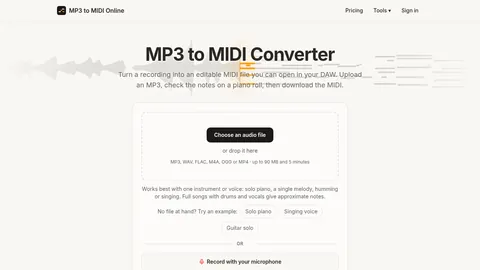
Browser audio-to-MIDI converter: turns an MP3, WAV, FLAC, M4A, OGG, video or microphone recording into an editable MIDI file
ToolSift score5.5/10
Why 5.5/10: Plus points: a named independent developer (Qianlong Guo) runs it, converting and previewing are free with no account, the free download allowance is usable (3 MIDI files a week, or 5 with a free Google sign-in), prices are plain with one-off download packs that never expire, there's a written 14-day refund if no paid download was used, and the about page names its models (Spotify's open-source Basic Pitch, and a ByteDance piano model for solo piano) and is candid about their limits. Minus points: the site only went live on 19 Oct 2026, output is a single MIDI track for now (multi-instrument is listed as coming soon), and full songs with drums and vocals only give approximate notes. This is an editorial assessment from the maker's own pages; we didn't use it ourselves.
By ToolSift editorial. Last checked . Prices change often; "check site" means verify with the vendor.
What it does
What it does: converts audio, video or a microphone recording into a MIDI file, with a piano-roll preview.
Free: up to 10 conversions a day; 3 MIDI downloads a week without an account, 5 with a free Google account.
Paid: Pro $7.99 a month, or download packs at $1.49 each or 10 for $4.99.
Our verdict
MP3 to MIDI Online converts a recording into a MIDI file in your browser. You upload audio or video (or record from the microphone), choose a setting such as solo piano, singing or guitar, check the detected notes on a piano roll and download the MIDI to open in FL Studio, Ableton Live, Logic or any other DAW. The same site has a MIDI player, viewer and MIDI-to-audio and sheet-music tools. Good for musicians who want a quick, free starting point from a simple recording of one instrument or voice; a busy full mix will only give a rough draft.
✅ Pick it if You want to turn a simple recording of one instrument or a melody into MIDI to edit in your DAW, without installing software.
⛔ Skip it if You need separate MIDI tracks for every instrument in a full mix, tempo detection, or a long-established tool.
Pricing:As of 27 Nov 2026, per the maker's pricing page (US dollars; sales tax or VAT added at checkout): Free is $0 with up to 10 conversions a day, unlimited piano-roll previews, files up to 5 minutes and 3 MIDI downloads a week without an account (5 a week with a free Google account). Pro is ≈ £5.96 ($7.99 listed)$7.99 (≈ £5.96) a month (yearly billing is also offered), with unlimited MIDI downloads, files up to 30 minutes (piano up to 10), up to 300 minutes of audio a month, full-length previews and 30-day history. Download packs cost ≈ £1.11 ($1.49 listed)$1.49 (≈ £1.11) per download or 10 downloads for ≈ £3.72 ($4.99 listed)$4.99 (≈ £3.72), and credits never expire. Payments go through Creem as merchant of record. Refunds are available within 14 days of payment if no paid download has been used. Prices are estimates converted from the provider's listed price on 2026-10-21; check the provider's site for current pricing.
Qianlong Guo, an independent developer (on X as @gql951024), who says the site went live on 19 Oct 2026. Free submission received 24 Nov 2026 via the ToolSift submit form. Not sponsored.
What to watch
Very new: the site only went live in mid-October 2026.
A full song with drums and vocals gives approximate notes only; output is one MIDI track for now (multi-instrument is listed as coming soon).
Free downloads are limited per week, and free files are limited to 5 minutes.
Not reviewed hands-on: we didn't upload a file, so accuracy is unverified.