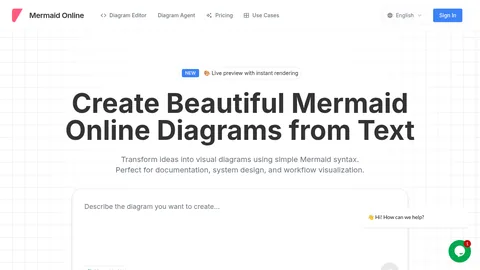
Why 4.5/10: The free code editor works: in a short browser check it rendered our own sequence diagram live without an account, it bundles a current Mermaid.js release (11.11), and SVG and PNG export are included. Minus points because it adds little over the official, open-source Mermaid Live Editor at mermaid.live, which is also free; the operator is anonymous, with only a personal Gmail address and no company, address or governing law; the site calls itself '100% free' with 'no hidden costs' and its terms say it is 'provided free of charge' while the pricing page sells AI credits at $9.90 a month for 100 credits or $12.90 one-time for 100 credits and puts visual styling behind a purchase; it titles pages 'Mermaid Live Editor' and 'Mermaid AI', the names of the official editor and Mermaid Chart's own AI product, with no statement that it is unaffiliated; it does not name the AI model behind its paid features; and its privacy policy does not mention the analytics, session-recording and chat scripts the site loads. This score is an editorial assessment based on the vendor's published pages and a brief check of the free editor, not a full hands-on test; we did not buy credits or try the AI features.
By ToolSift editorial. Last checked . Prices change often; "check site" means verify with the vendor.
What it does
The free editor is a two-pane page: Mermaid code on the left, a live preview on the right, with templates for about 19 diagram types (flowchart, sequence, class, state, ER, mindmap, Gantt, timeline, Sankey, XY chart, C4, architecture and more). In our brief check it rendered a diagram we typed without signing in, and the rendering ran in the browser.
Export is SVG or PNG, or copy the image or code to the clipboard. The site also runs separate converter pages (Mermaid to PNG, JPG, PDF, WebP, and image to Mermaid) and many near-identical landing pages for each diagram type.
AI features need an account (email or Google sign-in) and credits: text to diagram, screenshot to editable Mermaid diagram, and AI edits to an existing diagram, per the pricing page. The site does not say which AI model or provider does this. We did not try them.
Visual styling (themes, colours, font sizes, node shapes) is labelled 'PRO' in the editor and, per the pricing page, is 'permanently unlocked after purchase'. Saving up to 100 diagrams is listed as a paid-plan feature.
Our verdict
Mermaid Online is a web editor for Mermaid, the open-source syntax that turns plain text into flowcharts, sequence, class, Gantt, ER and other diagrams. You type Mermaid code on the left and a preview renders on the right; in our brief check with no account, a diagram we typed rendered immediately and the page did not send our diagram code to the site's server. Templates cover about 19 diagram types, and the editor exports SVG or PNG. The paid side is AI: the site says you can describe a diagram, upload a screenshot of one, or ask for edits, and get Mermaid code back, at one credit per generation or edit, with a Monthly Package at $9.90 a month for 100 credits or a One-time Package at $12.90 for 100 credits. That is the catch: the official Mermaid Live Editor at mermaid.live does the free part just as well, is open source and is run by the Mermaid team, while this site is run by an unnamed operator, borrows the official products' names in its page titles and contradicts itself about being free. Fine for a quick render if you land on it; for anything sensitive, or before paying for AI credits, use the official editor or a named vendor.
✅ Pick it if You want a quick Mermaid render and SVG or PNG export in the browser and are happy to use an unofficial site for non-sensitive diagrams, or you specifically want screenshot-to-Mermaid AI and accept buying credits from an unnamed operator.
⛔ Skip it if You want the official, open-source editor (mermaid.live), a named company behind the AI features you pay for, clear data-handling terms for work diagrams, or real-time collaboration from a known vendor.
Pricing:As of 21 Nov 2026, per the vendor's pricing page: the code editor, live preview, visual styling and SVG/PNG export are free with no account. New accounts get 2 welcome AI credits, and a daily check-in adds 1 credit. Paid AI credits: Monthly Package ≈ £7.39 ($9.90 listed)$9.90 (≈ £7.39) a month for 100 credits (valid one month); One-time Package ≈ £9.63 ($12.90 listed)$12.90 (≈ £9.63) for 100 credits (valid one month). Each AI generation or edit costs one credit. Visual styling uses no credits. Those are the only paid packs listed. Prices appear to be US dollars. Note the contradictions: some diagram-type pages still say the editor is free with no hidden costs, and the terms have described the service as free of charge, yet paid credit packs are live. The site itself is not open source (Mermaid.js, which it uses, is). Check site. Prices are estimates converted from the provider's listed price on 2026-10-21; check the provider's site for current pricing.
No person or company is named. The terms, privacy policy and footer give only a personal Gmail address (nietao2018@gmail.com) as contact, and the terms name no governing law or jurisdiction. The domain mermaidonline.live was registered on 12 Sep 2025 through GoDaddy, per the .live registry's RDAP record, and the site sits behind Cloudflare. It is not affiliated with the Mermaid open-source project or Mermaid Chart (the company behind the official mermaid.live editor and Mermaid AI) as far as we can tell, and it does not claim to be. Free submission received 26 Oct 2026 from support@mermaidonline.live. Not sponsored.
What to watch
Unofficial, and the official editor is free: mermaid.live, the Mermaid Live Editor run by the Mermaid team and Mermaid Chart, is free and open source and covers the same write, preview and export job. Mermaid Online's free editor adds little beyond it.
Name confusion: the site brands itself 'Mermaid Online' with its own logo and links to the official Mermaid repository, but its editor page is titled 'Mermaid Live Editor', the official editor's name, and it has a 'Mermaid AI' page, the name of Mermaid Chart's own AI product. We found no notice that it is unaffiliated. Mermaid Chart's terms of use say the company's name, logos and trade names are its trademarks.
Anonymous operator: only a personal Gmail address is given; no company, address, refund policy or governing law. Think twice before paying for credits, and use a card with chargeback protection if you do.
Contradictory 'free' claims: pages say '100% Free Forever' with no usage limits, and the terms still describe a free service, while AI credits are sold at $9.90 a month for 100 credits or $12.90 one-time for 100 credits, and theme styling is marked PRO. Feature lists on the diagram-type pages also mention collaborative editing and version history, which the pricing page does not list and we did not see in our brief check.
Unverified numbers: the diagram pages claim '100K+ Diagrams Created'. We found no way to check it and do not repeat it as fact.
AI model not named: the pricing page describes text-to-diagram, screenshot-to-diagram and AI edits, but the site does not say which model or provider processes your prompts and screenshots, or whether they are stored or used for training.
Privacy: the privacy policy is generic and names no third parties. In our check the site loaded Google Analytics, Microsoft Clarity (which can record page sessions), a Tawk.to chat widget, an IP-geolocation lookup (ipapi.co) and Google sign-in scripts. Our diagram code was rendered in the browser and not sent to the site's server, but avoid pasting confidential architecture into any unofficial editor.
We only briefly checked the free editor in a browser; we did not sign up, buy credits or test the AI features.