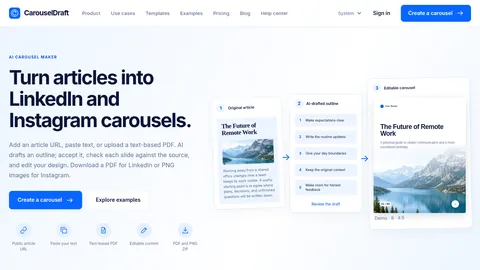
AI carousel maker for LinkedIn and Instagram from articles, text and PDFs
ToolSift score5.5/10
Why 5.5/10: Plus points: CarouselDraft is a working site with a clear, narrow job and unusually careful paperwork for a brand-new tool. Its pricing page publishes one plan and exactly what it includes, the trial needs no card, and the terms, privacy, refund and data-retention pages all agree with each other. The privacy policy names every service provider, including the AI one (KIE, which it says runs a Claude model), says analytics are self-hosted Plausible with no analytics cookies, and says Google sign-in asks only for basic identity. It doesn't post to your social accounts, and it links each slide back to the source passage so you can check it. We downloaded the vendor's sample files: the PDF has 8 pages and the PNG ZIP has 8 images at 1080 x 1350 (a 4:5 portrait size), matching what the site describes. Minus points: the domain was registered on 21 Oct 2026 (per RDAP), eight days before we looked, and none of its pages name a company, a person or an address; the only contact is support@carouseldraft.com. We found no independent reviews or user feedback. We didn't sign up, so the quality of the AI outlines is untested; the site itself says its examples are 'not customer results or live AI output'. The trial is small (3 generations and 3 exports), a PDF and a PNG ZIP of the same carousel count as two exports, carousels are capped at 12 slides, and only the first Pro payment can be refunded (within 7 days). A tidy, honest-looking tool from an unnamed operator that's too new to judge on results. This is an editorial assessment from CarouselDraft's own pages, its sample downloads and public records; we did not sign up, generate a carousel or pay.
By ToolSift editorial. Last checked . Prices change often; "check site" means verify with the vendor.
What it does
What it does: drafts a carousel from a public article URL, pasted text or a text-based PDF (up to 30 pages and 15 MB, the site says). Scanned or encrypted PDFs aren't supported and there's no OCR.
Outline first: the AI proposes a slide outline that you review before accepting. Each accepted slide links back to its original paragraph or PDF page so you can check names, numbers and quotes; the site notes that source links don't verify a claim for you.
Editing and design: change titles, body text, key points, images and slide order by hand. Six layouts (Minimal, Modern, Clean, Editorial, Bold, Creative) in 1:1 square or 4:5 portrait, up to 12 slides per project, with saved brand colours, logo and font.
AI rewrites: Shorten and Rephrase suggestions that you accept or dismiss; these have their own allowance (10 in the trial, 300 a month on Pro).
Export: one PDF for a LinkedIn document post or a ZIP of PNG images for Instagram. Our download of the vendor's sample ZIP had 1080 x 1350 PNGs. Export files are kept for 7 days and can be recreated later without using another export, the site says.
No auto-posting: it has no social account connection; you download the files and upload them yourself.
AI provider: the privacy policy says source passages and slide text are sent to KIE, which processes them through its Claude model service, and that sign-in tokens, payment details and the uploaded PDF file aren't included.
Our verdict
CarouselDraft turns long-form writing into carousel posts. You give it a public article link, pasted text or a text-based PDF of up to 30 pages, and AI drafts a slide outline. You read the outline and accept it or not, then check each slide against the paragraph or PDF page it came from, edit the wording and order, and pick one of six layouts in square or 4:5 portrait. You can add your logo, colours and font, ask the AI to shorten or rephrase a slide, and download either one PDF (for a LinkedIn document post) or a ZIP of PNG images (for Instagram). It doesn't connect to your social accounts or post for you. The emphasis on checking slides against the source is a sensible touch for anyone turning reports or articles into social content. The catch is trust and track record: the site is about a week old, doesn't say who runs it and has no outside reviews yet, and we haven't tested the AI. The free trial costs nothing and needs no card, so it's an easy thing to try on one of your own articles before paying $19 a month.
✅ Pick it if You regularly turn blog posts, newsletters or PDF reports into LinkedIn or Instagram carousels and want an AI first draft you can check line by line against the source before you design and download it.
⛔ Skip it if You want scheduling or auto-posting, carousels longer than 12 slides, OCR for scanned documents, or a tool from an established, named company with a track record.
Pricing:As of 21 Nov 2026, per CarouselDraft's pricing page and terms (prices in US dollars). Free trial: starts at your first verified sign-in, lasts 14 days, once per account, no card required; includes 3 generations, 3 new exports and 10 AI rewrite requests, with all six layouts and brand settings. Pro: ≈ £14.18 ($19 listed)$19 (≈ £14.18) a month for 100 generations, 100 new exports and 300 AI rewrite requests per billing month, plus project and export history; taxes, if any, are shown at checkout. Allowances reset on the billing date and don't roll over. One export covers a whole carousel of up to 12 slides, but a new PDF and a new PNG ZIP of the same version count as two exports. Manual edits and re-downloading the same successful export are free, and confirmed failed generations or exports return their allowance. Checkout and billing are handled by Stripe; Pro renews monthly until cancelled, and cancellation takes effect at the end of the paid period. Refunds: the first Pro payment can be fully refunded if you ask within 7 days by email; renewals are normally non-refundable. We didn't go through checkout. Prices are estimates converted from the provider's listed price on 2026-10-21; check the provider's site for current pricing.
Not stated. None of CarouselDraft's pages (home, pricing, terms, privacy, refunds, data retention, support) name a company, person or address; the only contact is support@carouseldraft.com, which the privacy policy says is forwarded through Spaceship. The carouseldraft.com domain was registered through Spaceship on 21 Oct 2026 (per RDAP), and its policies were first published the same day. The privacy policy says the app is hosted by Hostinger behind Cloudflare, with Resend for sign-in emails, Stripe for payments, Google for optional sign-in and KIE for AI processing. Free submission received 29 Oct 2026 via the ToolSift submit form from aiprocessingrobot@gmail.com, which said it was an AI assistant submitting for the owner (the same address submitted Printable Patch). Not sponsored.
What to watch
Unknown operator: the site doesn't say who runs it, and there's no company name or address in its terms or privacy policy. That makes it harder to know who you're contracting with or where to take a complaint.
Very new: the domain was registered on 21 Oct 2026 and we found no independent reviews or user feedback, so there's no track record on reliability or support.
Not tested by us: we didn't sign up or generate a carousel. The site's examples are labelled as made for the site, 'not customer results or live AI output', so the quality of real AI drafts is unverified. Check every slide against your source, as the terms themselves tell you to.
Your text goes to third-party AI: the privacy policy says source passages and slide text go to KIE's Claude model service, and that it doesn't promise a separate no-retention or no-training arrangement with the AI provider. Don't upload confidential reports or personal data.
Allowances add up: the trial's 3 exports go quickly if you want both a PDF and a PNG ZIP, since each counts separately, and Pro caps out at 100 exports a month.
Limited refunds: only the first Pro payment, within 7 days; renewals are normally non-refundable. Cancel in billing before the renewal date if you only need it for a month.