By ToolSift editorial. Last checked . Prices change often; "check site" means verify with the vendor.
What it does
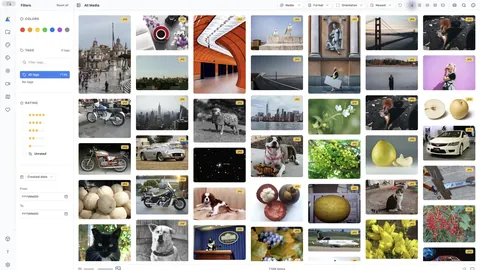
What it does: organises photos, videos and Live Photos on your computer with albums, tags and filters.
Search: find images by filename or by describing them in plain language, locally.
Price: Free (up to 50,000 assets); Standard $9.99 a month; Premium $19.99 a month.
Our verdict
AePix is a desktop app that turns folders of photos, videos and motion photos into a browsable library. You add files or folders, organise them with albums, rule-based smart collections, tags, star ratings and colour labels, filter by format, orientation or date, and search either by filename or by describing what you remember. It also compresses and converts images in batches, and paid plans add reverse image search and OCR. Good for creators and hobbyists with large local photo folders who want AI search without moving everything into a cloud service, as long as they're comfortable with an early app from an unnamed maker.
✅ Pick it if You keep big folders of photos and video on a Mac or Windows PC and want local AI search and organising without uploading your library.
⛔ Skip it if You want a mature app from a known company, or you already manage everything in Apple Photos, Lightroom or Google Photos.
Pricing:As of 27 Nov 2026, per the maker's pricing page (US dollars): Free is $0 for personal use, up to 50,000 assets, with albums, smart collections, tags, filters, local natural-language search and image compression and conversion. Standard is ≈ £7.45 ($9.99 listed)$9.99 (≈ £7.45) a month, up to 500,000 assets, adding reverse image search, OCR and 200 cloud AI credits a month. Premium is ≈ £14.92 ($19.99 listed)$19.99 (≈ £14.92) a month, with no plan asset limit and 500 credits a month. Annual billing and separate credit packs are also offered; cloud AI tools use credits on every plan. Check the pricing page for current yearly prices. Prices are estimates converted from the provider's listed price on 2026-10-21; check the provider's site for current pricing.